About Management and Monitoring Utilities
Greenplum Database provides standard command-line utilities for performing common monitoring and administration tasks.
Greenplum command-line utilities are located in the $GPHOME/bin directory and are run on the master host. Greenplum provides utilities for the following administration tasks:
- Installing Greenplum Database on an array
- Initializing a Greenplum Database System
- Starting and stopping Greenplum Database
- Adding or removing a host
- Expanding the array and redistributing tables among new segments
- Managing recovery for failed segment instances
- Managing failover and recovery for a failed master instance
- Backing up and restoring a database (in parallel)
- Loading data in parallel
- Transferring data between Greenplum databases
- System state reporting
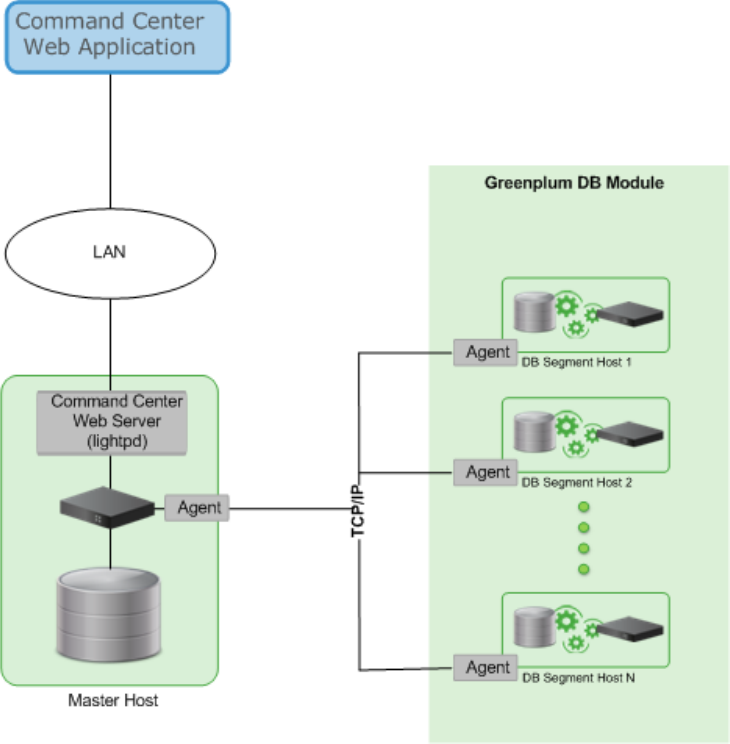
VMware provides an optional system monitoring and management tool, Greenplum Command Center, which administrators can install and enable with Greenplum Database. Greenplum Command Center provides a web-based user interface for viewing system metrics and allows administrators to perform additional system management tasks. For more information about Greenplum Command Center, see the Greenplum Command Center documentation.